


Think together: Slate
One living page for the whole team, in place of slides, documents and spreadsheets. Each person adds their part through their own AI, and each AI reads the whole project before it writes.
- Opening a new warehouse: three teams work on one Slate.
- On their own computer, the operations lead asks their AI, which reads their own notes and the whole Slate.
- Their AI updates the site checklist, and only that part.
- Finance does the same: its AI already sees the new checklist, and updates the cost dashboard.
- HR's AI reads the headcount plan and the Slate, and adds the hiring plan.
- The owner shares the Slate inside the company only, as editor, commenter or reader.
- Everyone works on one current page, every change is saved as a version, and nothing is sent back and forth.
What a Slate can hold
| On a Slate | What it does for the team |
|---|---|
| Interactive charts and dashboards | Readers filter and explore the figures instead of reading a screenshot |
| Tables to fill in and checklists | Editors fill in fields and tick off tasks on the page, and everyone sees the change |
| Layers and tabs | A one-screen summary, with the detail one click below |
| Timelines and plans | Milestones, owners and dates in one view |
| Animated process flows and org designs | A process that plays step by step, and a structure readers can click through |
| Decision logs and comments | What was decided and by whom, and a question on a section that names who should answer |
How a team builds one
- An owner starts it, through their AI or from the portal, in minutes, with no app to build.
- Each member adds their part through their own AI.
- Each AI reads the whole Slate first, so every new section builds on what the team already knows.
- It reads as one piece of work, in your organisation’s own design.
- Nothing is lost: every change is a version, and any earlier version can be restored.
Good uses
- A cross-team project, from plan to status
- A board pack readers can explore
- A business case with live models
- A team’s operating rhythm
- An org redesign
Start from what works: Templates
Substrait builds templates of common business software, based on best practice from its own experience of building and running business systems. Each template arrives already wired to your company, so a team starts from working software instead of a blank prompt.
- Browse Substrait's template library: common business software, ready to use.
- Each template follows Substrait's best practice, from its own experience of building business software.
- Pick one, and it arrives already wired to your company.
- Click Deploy, and the template goes live as your team's own tool.
- From there, your team keeps building on it, one change at a time.
The catalogue
Department starters:
- Procurement
- Inventory and warehouse
- Orders
- Service desk
- Supplier management
- Assets and maintenance
- Quality
- Expenses and claims
- HR
- Account management
Common shapes:
- Approval router
- Partner portal
- Scorecard
- Document generation
- Reconciliation
- Leakage recovery
- Field data collection
What comes in every template
- Your company’s sign-in and identity, from the first version
- Your cloud, your deploy and rollback paths, and your security settings
- Your organisation’s design
- Working code and its setup, so the first deploy goes live
What never comes with a template
- No secrets, settings or sign-in lists from anywhere else
- No access to data: the new tool asks its data owners for its own grants
Copy it, and it is yours
A team copies a template and changes it to fit how it works. Substrait keeps no central version your team must stay on.
Ask, and it gets built: Agentic Builder
Anyone with a tool, or an idea for one, writes a request in plain words. Build agents do the building, and the tool’s owner stays in charge of every change.
- A new app, a new feature or a bug fix: ask in plain words.
- Every request lands on one board, planned into your roadmap and pipeline.
- The owner clicks Build, and build agents plan, build and test it.
- The owner takes it live, through the security check.
From request to live tool
| Stage | What happens |
|---|---|
| Requested | A feature or a fix is filed in plain words, from the portal or from the builder’s AI |
| Ready | The owner or a collaborator accepts it; anything declined is recorded with who decided |
| Building | The owner clicks Build. Build agents plan, build and test the change. |
| Check on Dev | The change is live in dev, behind your sign-in, for the owner to try |
| Live | The owner takes it live, through the security check |
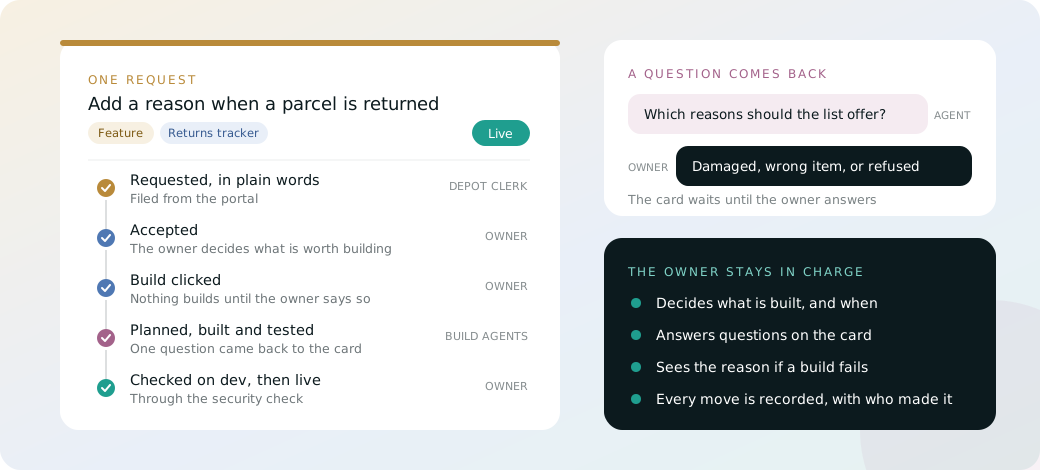
The owner stays in charge
- Nothing builds without the owner. A build starts only when the owner clicks Build, so the owner decides cost and timing.
- Questions come back to the card. If a build agent needs an answer before it builds, the card waits, and the owner answers on the card.
- A failed build explains itself. The card returns with the reason, and a person decides what happens next.
- Every move is recorded, with who made it.
Requests from wherever people work
- Each tool has its own board, on its Requests tab.
- My requests shows one board across every tool a person works on.
- Builders file, list and move requests from their AI, without leaving it.
Stay in the loop: the communications centre
The communications centre is one central, pre-wired exchange that connects every alert, approval, notification and message across the organisation. Every tool built on Substrait calls it, so no tool has to build its own notifications, emails, approvals or messaging.
- Without it, every tool builds its own alerts, emails and approvals.
- With Substrait, every tool calls one pre-wired exchange.
- It delivers to the channels your company already uses.
- AI agents and personal assistants plug into the same exchange.
- A routine approval can go to the approver's own AI, which answers it in seconds, within limits the approver set.
- Anything outside those limits reaches the approver, and every answer is recorded.
One exchange, every tool
- One API. A tool declares the kinds of message it sends, and sends them through the communications centre.
- Followed, not blasted. People, teams and other tools follow the messages they need.
- Answered where they arrive. A reply or an action goes straight back to the tool that sent the message.
Your company’s own channels
Your company hooks in the channels it already uses: Slack, Google Chat, Microsoft Teams, email, SMS or WhatsApp. From then on, every tool built on Substrait reaches people there, with nothing more to build. Each person chooses where their notices arrive, and the inbox on their Home page holds everything.
Every approval in one inbox
- One badge shows every request waiting on a person, from every tool.
- Approve or reject from the inbox, with a reason for every rejection.
- Nobody approves their own request.
- A requester sees where each of their requests stands.
Help from your own AI
A person can let their own AI read their notices and handle the routine ones, within limits they set. An approval is never routed back to the requester’s own AI, so no AI approves its own request.
Brokered and on the record
Substrait decides which tool may reach whom, under the same identity and permissions as everything else. A message to someone a tool may not reach is refused and recorded. Admins see how much each tool sends, and can pause a noisy one.